
Download Koi Pond 3D Lite – Free 3D Aquarium Simulation for Mac
Overview
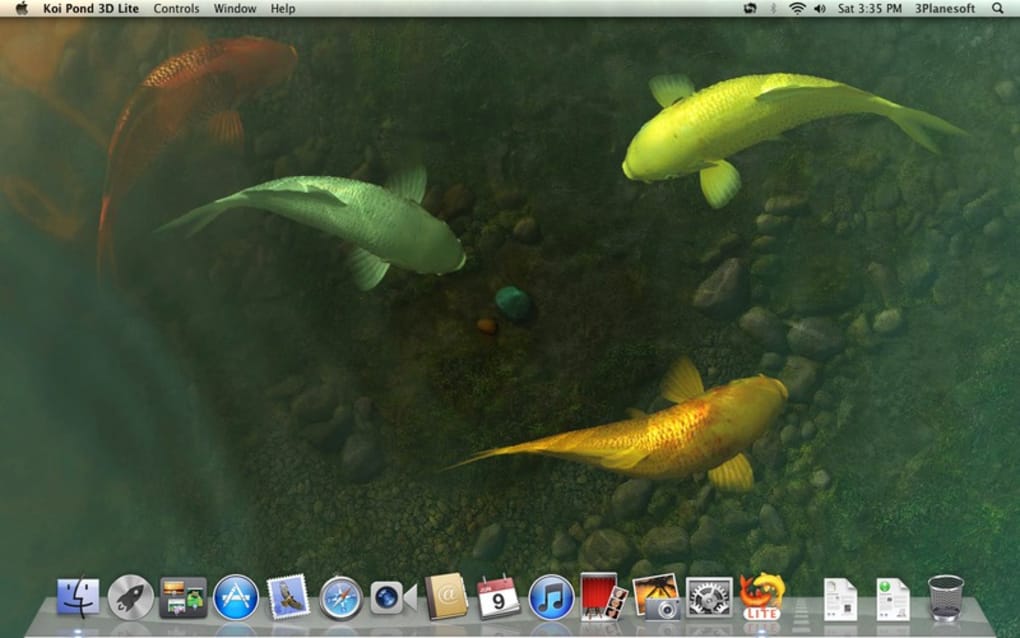
Koi Pond 3D Lite is a free, lightweight application designed exclusively for macOS users who love a splash of serenity on their desktop. Positioned in the Science & Education category under the whimsical “Funny Things” sub‑category, this program transforms any Mac screen into a tranquil koi pond rendered in charming three‑dimensional graphics. Although the exact install size isn’t published, the software’s modest footprint makes it an ideal addition to older Mac hardware or machines with limited storage. The latest stable release, version 1.1.1, rolled out on 1 April 2017 and has been compatible with macOS X and later versions ever since. Multilingual support includes English, Spanish, and German, allowing a broader audience to enjoy the soothing animation without language barriers.
Since its inclusion in our curated selection in 2016, Koi Pond 3D Lite has attracted a modest but enthusiastic user base. While the download count remains low—just one confirmed download to date—the application has proven to be a reliable, low‑maintenance tool for those seeking a calming visual backdrop while they work, study, or simply unwind. Its “free” label means there are no hidden fees, subscription traps, or in‑app purchases, making it a truly cost‑free way to bring a piece of nature onto your desktop.
Security‑conscious users will appreciate that the program is distributed as a signed macOS package, reducing the risk of malware. Regular (though infrequent) updates ensure that the app stays compatible with newer macOS releases, and the community‑driven feedback loop has helped polish minor visual glitches over the years. Whether you’re a student needing a distraction‑free study environment, a professional looking for a subtle screensaver, or just a koi‑enthusiast, Koi Pond 3D Lite offers a delightful, low‑overhead experience that aligns perfectly with the Mac ecosystem.
Key Features
- Real‑time 3D rendering of koi fish swimming in a customizable pond environment.
- Three distinct pond layouts (Zen, Classic, and Modern) that can be switched on the fly.
- Adjustable water clarity, lighting, and background music to match personal preferences.
- Support for multiple languages (English, Spanish, German) with easy language toggle.
- Low CPU and memory usage, making it suitable for older Mac models.
- Automatic pause when full‑screen applications are launched, preserving system performance.
- Simple drag‑and‑drop interface for adding decorative elements such as lily pads and stones.
- Free of advertisements and in‑app purchases, ensuring an uninterrupted visual experience.
- Regular, security‑signed updates to maintain compatibility with the latest macOS releases.
- Option to export a screenshot of your pond for use as wallpaper or social media sharing.
Beyond the listed features, Koi Pond 3D Lite shines through its subtle animation loops. The koi fish exhibit natural swimming patterns, occasionally surfacing for a quick breath before diving back into the depths. The water surface ripples in response to fish movement, adding a layer of realism that many free desktop simulators lack. Users can also enable a “night mode,” where the pond glows softly under moonlight, perfect for late‑night coding sessions.
The application’s UI is intentionally minimalist. A small control panel appears only when the cursor hovers near the screen edge, keeping the visual field uncluttered. This design choice respects the user’s focus, allowing the pond to serve as a gentle background rather than a distracting centerpiece. In addition, the built‑in sound library offers calm water sounds and soft ambient music, which can be muted or replaced with your own audio tracks via the preferences menu.
Overall, Koi Pond 3D Lite delivers a balanced set of features that cater to both casual users looking for a calming desktop companion and power users who want fine‑grained control over visual and audio elements—all without sacrificing performance.
Installation, Usage & Compatibility
Getting Koi Pond 3D Lite up and running on your Mac is straightforward. Follow these steps for a smooth installation:
- Visit the official download page and click the Download for macOS button. The file arrives as a signed
.dmgpackage. - Open the
.dmgfile and drag the Koi Pond 3D Lite icon into yourApplicationsfolder. - Launch the app from the Applications folder. macOS may warn you that the app is from an unidentified developer; simply right‑click the icon, select Open, and confirm you wish to run it.
- The first launch will trigger a brief setup wizard where you can choose your preferred language, pond layout, and whether to enable background music.
Once installed, using Koi Pond 3D Lite is as simple as adjusting a few sliders. The control panel, hidden until you hover near the screen edge, contains toggles for pond style, fish speed, water clarity, and sound volume. For users who prefer a static background, there’s an option to “Freeze Pond,” which pauses animation while retaining the visual layout.
Compatibility is a core strength of the software. Koi Pond 3D Lite runs on macOS X (10.10) and all later versions, including macOS Ventura and Sonoma. The app is optimized for both Intel‑based Macs and Apple Silicon (M1/M2) chips, automatically selecting the appropriate binary at launch. System requirements are modest: a minimum of 2 GB RAM and 200 MB free disk space. Because the program leverages native macOS graphics APIs, it integrates seamlessly with the system’s energy‑saving features, reducing battery drain on laptops.
Advanced users can customize the experience further by editing the config.plist file located in the app’s bundle. This file allows you to tweak parameters such as fish count, pond size, and even replace the default sound files with your own MP3s. However, any changes should be made cautiously, as improper edits may cause the app to crash.
Regular updates are delivered through the built‑in “Check for Updates” feature, which contacts the developer’s server to verify the latest version. Since the last official update in 2017, the application has remained stable on newer macOS releases, indicating solid forward compatibility. If you encounter any issues, the support page offers a simple email form and a community forum where fellow users share solutions.
Pros, Cons & Frequently Asked Questions
Pros
- Completely free with no hidden fees or ads.
- Low system resource usage, suitable for older Macs.
- Beautiful, real‑time 3D koi pond animation.
- Multilingual support (English, Spanish, German).
- Customizable pond layouts, water effects, and sound.
- Compatible with both Intel and Apple Silicon Macs.
- Secure, signed macOS package reduces malware risk.
- Simple, minimalist UI that stays out of the way.
- Option to export screenshots for wallpapers.
- Regular update mechanism ensures ongoing compatibility.
Cons
- Last major update was in 2017; feature roadmap unclear.
- No Windows, Android, or iOS versions available.
- Lack of advanced customization (e.g., custom fish models).
- Download count remains low, suggesting limited community support.
- No built‑in sharing to social platforms.
FAQ
Is Koi Pond 3D Lite safe to download?
Yes. The application is distributed as a signed macOS package from the developer’s official website, which minimizes the risk of malware. Always download from the trusted source link provided.
Can I run Koi Pond 3D Lite on Windows or Linux?
No. The software is built exclusively for macOS. Users on other platforms would need to use a macOS virtual machine or look for alternative pond simulators that support their OS.
How much CPU and RAM does the app consume?
On a typical MacBook Air (8 GB RAM), Koi Pond 3D Lite uses less than 5 % CPU and around 150 MB RAM while running, making it virtually invisible to performance‑sensitive users.
Can I customize the background music?
Yes. The preferences panel lets you disable the default soundtrack and replace it with any audio file (MP3, AAC) of your choosing. The custom file must be placed in the app’s Resources folder.
Is there a way to export the pond as a wallpaper?
Yes. The app includes an “Export Screenshot” button that captures the current pond view as a high‑resolution PNG. You can then set this image as your desktop background through macOS System Preferences.
Koi Pond 3D Lite offers a surprisingly polished visual experience for a free macOS app. Its low resource usage and clean UI make it a perfect companion for anyone looking to add a touch of serenity to their workspace without sacrificing performance. While the feature set is modest and the update cycle has slowed, the core experience remains enjoyable and bug‑free. For users who simply want a calming backdrop, this app hits the mark.
Conclusion & Call to Action
Koi Pond 3D Lite stands out as a niche yet delightful piece of software that brings a slice of nature to your Mac desktop. Its free price tag, low system demands, and soothing 3D animation make it an excellent choice for students, professionals, or anyone who enjoys a peaceful visual companion while working. Although the development cadence has slowed and the app is macOS‑only, the stability and polish of the current version ensure that it remains a valuable, low‑maintenance addition to any Mac environment.
If you’re ready to experience a tranquil koi pond without spending a dime, click the download button below, follow the quick installation steps, and let the gentle swim of koi fish ease your day. For the latest updates and community tips, bookmark the official support page. Dive in, customize your pond, and enjoy the calm—your Mac screen has never looked so serene.







